TRIAL > Salesforce, Genesys Cloud CTI

Talk to a Trial expert !

Trusted by Enterprises, SI Partners and more than 100 of you











Trial of the integration of your favourite apps
CTI > Salesforce, Genesys Cloud
The trial offers a ready configuration as a default template configured for Voice showcasing the agent usage of the integrated app.
Free trial - features & usecases.
When you enroll for a free trial, the setup wizard automatically creates the integration for your Genesys Cloud Org and provide with the following:
- A Default template of configuration (Predefined pop-up, context, channel and data sync).
- Access to Config Panel (GUI based tool to customize your integration further).
- Book a meeting to talk to an expert for any querries on usage or support that you may need during your trial.
Free trial - features & usecases.
When you enroll for a free trial, the setup wizard automatically creates the integration for your Genesys Cloud Org and provide with the following:
-
CTI Integration for Trial for Dynamics 365 with Genesys Cloud.
DEFAULT
The trial automatically enables a default configuration template for your Genesys Cloud Org with a predefined set for
- Universal Queue Config
- Caller record identification.
- Communication Channel
- Entity Pop-up
- Prefill & Quick entity creation.
- Data Sync
CONFIGURABLEWith the Config Panel provided to you, you can edit your integration settings to either DIY or use our Trial help.
- Custom config for each Queue
- Custom caller indentification
- More Channels
- Custom Entity Pop-up
- Custom Quick entity options
- Custom Data Sync settings.
-
 Channels
DEFAULT
Channels
DEFAULTVoice channel
CONFIGURABLEAdd configuration for Webchat, Email and IM as applicable.
-
 Caller record identification
DEFAULT
Caller record identification
DEFAULTCaller record is identified based on ANI
CONFIGURABLESet configuration to identify incoming conversation by
- ANI
- or Participant Data / IVR input.
- or 3rd party data dip
- or a combo of any of above.
-
 Entity Lookup in CRM
DEFAULT
Entity Lookup in CRM
DEFAULTSearch for customer record in Contact Entity
CONFIGURABLESearch for corresponding records in multiple Entities in CRM.
-
 Pop-up Entity
DEFAULT
Pop-up Entity
DEFAULTSingle Entity Pop-up - 'contact'
CONFIGURABLEPrimary Entity and one or more associated entities.
-
 Prefill & New Entity creation action..
DEFAULT
Prefill & New Entity creation action..
DEFAULTPrefill for creation of new contact.
CONFIGURABLEMultiple custom options.
-
 Search Record & Tag conversation
DEFAULT
Search Record & Tag conversation
DEFAULTUser can manually search 'contact' by 'phoneno' and tag the conversation to that contact.
CONFIGURABLEUser can manually search among multiple Entities and with various params.
-
 Data Sync
DEFAULT
Data Sync
DEFAULTAuto-update 'phonecall 'Activity Entity associated to 'contact' with 'call direction' and 'notes'.
CONFIGURABLESet multiple data actions for auto updating upon completion of a conversation.
Prerequisites for the trial
Following are the prerequisites for the trial.
-
Genesys Cloud CX functional OrgFuctional setup of Genesys Cloud CX Org with necessary Queues, campaigns and configured channels (voice, chat, Email - as applicable).
-
Salesforce OnlineFuctional Salesforce Cloud instance - with sample customer data. Users, roles and admin user with privileage to create a Company app, add OpenCTI and assign user roles.
-
AppxconnectValid subscription of APPXCONNECT > CTI
-
BrowserChrome, Edge
Supported versions & apps
Following versions & apps are supported for the trial.
-
Genesys Cloud CXCommunicate & Collaborate Users of Genesys Cloud CX, versions - 1, 2 & 3.
-
Salesforce OnlineEssentials, Professional, Enterprise, Performance, Unlimited, and Developer Editions
-
ServiceNow Modules & Workspaces
Sales Cloud, Service Cloud,
Lightning Experience
Setting up the free trial !
Here's a step by step look at how it is setup.

Activate your Trial
Adds Appxconnect's CTI Trial subscription to your Genesys Cloud Org.
-
 Appfoundry
Under 1 Minute.
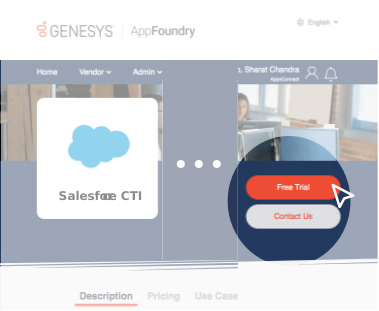
The first step > Browse for AppxConnect's product listing on Genesys Appfoundry. Select FREE trial, proceed next following through the steps to activate and authorise trial for your Genesys Cloud Org.
-
 Send Details
2-3 Minutes.
Send the details of your Salesforce domain URL to trial@appxconnect.com
Your CTI will automatically be setup with default settings. You will recieve a confirmation email along with -
- CIF url
- CTI package to be uploaded.
- Access to control panel to change settings.
- Guide for using control panel.
- Agent usage guide.
-
 Setup Wizard
2-3 Minutes.
Go to > My Apps , Choose your added app of Appxconnect & run the setup wizard.

Setup OpenCTI in Salesforce
Setup OpenCTI, assign user roles.
-
 Update Openframe
~ 5 minutes.
Login to your Salesforce account, Go to OpenCTI.
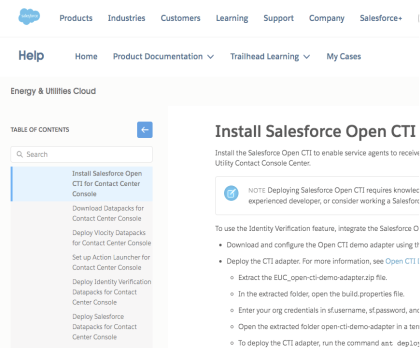
Update OpenCTI library with the CTI Package provided in the Email following the steps in the guide.
-
 Assign Apps.
Under 1 Minute.
Assign OpenCTI to the Salesforce module.
-
 Assign users & roles.
Under 1 Minute.
Assign users roles for whom you need the CTI integration.

Voila ! your setup is complete.
Your CTI integration is complete, your users can login to their app and start attending to conversations from within your Salesforce app.
You can also access the control panel (credentials provided in the email confirmation) to further personalize specific to your business.

Feel free to contact your Trial expert through out your trial journey.
Guides & Resources to help you move faster.
Agent Features - Fact Sheet.
Explore the complete set of features for contact center agents in the integrated app.
Learn more . >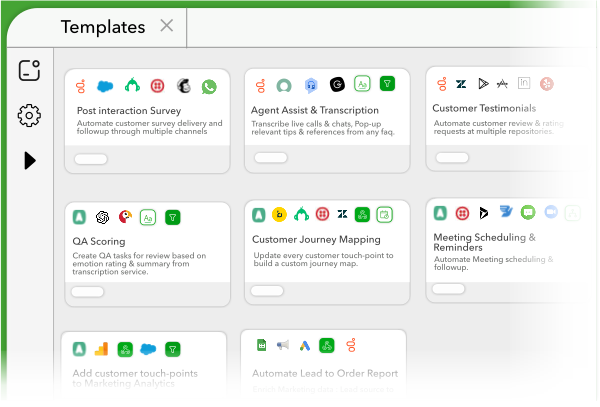
Solution Architecture
Learn more about Architecture, Prerequisites and design considerations that fulfill the integration.
Learn more >
Trusted by Enterprises, SI Partners and more than 100 of you

faq
There are a few ways to order Appxconnect for your Genesys Cloud Org:
- On AppFoundry (Free Trial) - Appxconnect can be enabled for Free Trials, and may be quickly added by an authorized user on AppFoundry after authentication. Free Trials are purchases with a future bill date of one month from the Free Trial activation. A Free Trial is a Month-to-Month (MTM) subscription without a commitment, allowing customers to cancel at any time in the app.
- On AppFoundry (Purchase) - Appxconnect can be enabled for Purchase, may be quickly added by an authorized user on AppFoundry after authentication. Purchases are activated immediately on the customer subscription. Purchases are a Month-to-Month (MTM) subscription without a commitment, allowing customers to cancel at any time in the app.
- Sales Assisted - Genesys Sales Representatives and Authorized Genesys Resellers can assist any customer with an AppFoundry purchase or Free Trial.
 Log in with Google


